Modifications in V2026.x
 Servicepack V2026.3.4.0
|
ID: |
Area: |
Note: |
|---|---|---|
|
CG-4323 |
Niche back panel |
When creating a copy of your planning the changes in pattern and material positioning of niche back panels is now transferred correctly. |
|
CS-11803 |
CARAT one |
The errors that occurred when saving bundles have been resolved. |
|
CS-11864 |
Tradeplace |
When ordering via Tradeplace, the stock number and the GLN The Global Location Number (GLN) and/or International Location Number (ILN) identifies international whole companies or subsidiaries as well as their physical location. They are assigned by the GS1 organisation. The GLN number has always 13 characters, where the first three positions represent the EAN-country number of the GS1-memberschip, for example Germany is specified 400-440. are now transferred without errors. |
|
CUS-271 |
Errors when reading master data sets in CARAT have been resolved. |
Hotfix V2026.3.3.2 (This version contains only bug fixes)
|
ID: |
Area: |
Note: |
|---|---|---|
|
CUS-276 |
Program Start |
An error message that occurred when starting CARAT has been eliminated. |
Hotfix V2026.3.3.1 (This version contains only bug fixes)
|
ID: |
Area: |
Note: |
|---|---|---|
|
CG-4432 |
Installation symbols |
Installation symbols planned into floor or ceiling remain permanently saved and visible again. |
Servicepack V2026.3.3.0
|
ID: |
Area: |
Note: |
|---|---|---|
|
CG-4380 |
Perspective |
Erroneous cast shadows on articles due to incident sunlight do not appear anymore. |
|
CG-4377 |
Front view |
Erroneous display of front segmentation on articles has been resolved. |
|
CS-11736 |
Quote and invoice |
Block credits will not be considered anymore during calculation of the total discount. The actual price per article group is now displayed. |
|
CS-11754 |
Subsidiary Management (Module 5W) |
The missing display of block price groups in the maintaining subsidiary on the Block prices tab of the Block data after creating a new condition group in the CARAT cloud portal has been eliminated. |
|
CS-11849 |
New CARAT database |
Customized calculation groups In a calculation group are arranged any quantity of items that have an item specific similarity. So typically all items, e.g. furniture parts, but also worktops, sinks, or electrical appliances, are consolidated into appropriate named calculation groups. and conditions will now always be copied too when Copying catalogues. This is valid for all kinds of catalogues. |
Hotfix V2026.3.2.1 (This version contains only bug fixes)
|
ID: |
Area: |
Note: |
|---|---|---|
|
CG-4377 |
Front view |
Erroneous display of front segmentation on articles has been resolved. |
Servicepack V2026.3.2.0
Featurepack V2026.3.1.0
|
ID: |
Area: |
Note: |
|---|---|---|
|
New |
LumiQ Lighting Planner |
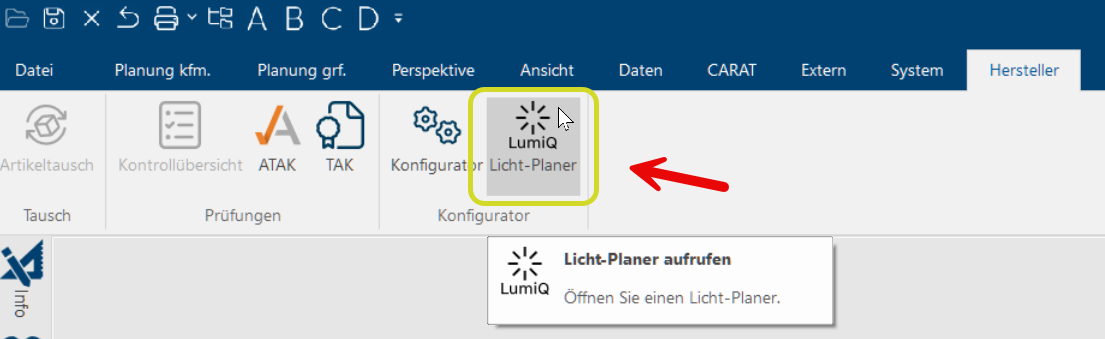
From this version on you can use the new LumiQ Lighting Planner by Schüller for your CARAT plannings. With just a few clicks Typically the LEFT mouse button is pressed once quickly, if not specified differently. Clicking will either mark an object, or when clicking on a button, the execution of the desired activity (e.g. OK, Cancel, Close). you can choose from different Lighting packages suitable for your planning or an individual option The word option (from Latin: optio = free will) used in computing means a choice. In CARAT it is normally used with a list box.. The articles contained in the lighting packages will then be transferred automatically into your parts list of your CARAT planning and the kitchen illumination will be adapted accordingly. Whether it's working lights, recessed handles or atmospheric accentual illumination, you can design the kitchen illumination completely at buyer's option quickly and easily. You can start the LumiQ Lighting Planner via the register Manufacturer in the menu bar, then click on LumiQ Lighting Planner in the Configurator area.
The LumiQ Lighting Planner is available for plannings with the Schüller catalogue NEXT 125 2026 starting with catalogue status 25/26 and following. In order to start LumiQ Lighting Planner, a customer number distributed by Schüller must be entered in the catalogue master data. The displayed sales prices for the offered Lighting packages result from the calculation settings you entered beforehand for this catalogue in CARAT. See also: The LumiQ Lighting Planner |
|
New |
User rights example planning |
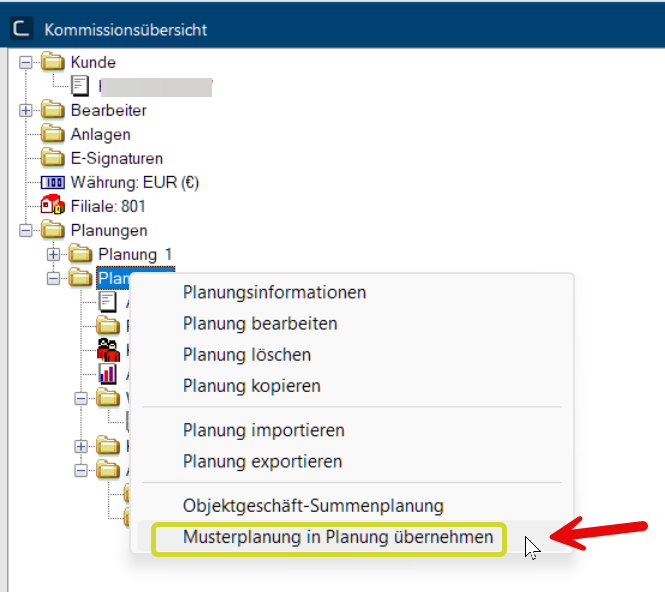
Authorized users can now transform example plannings into existing plannings within a commission via the commission overview. In order to retain control over the use of this feature, the User right: 5507 Transfer example planning into existing plan was created. This user right is not activated by default in the Authorization administration and can be assigned selectively to particular users or user groups by the administrator.
|
|
New |
Corner window |
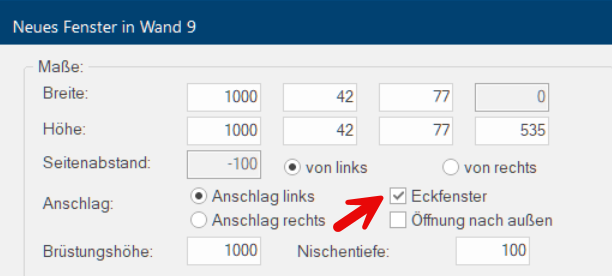
Corner windows can now be included in your planning using the dialogue Dialogue, dialogue windows or dialogue fields are special windows in software applications. Dialogue windows are displayed by application programs in different situations to request input or confirmation from the user. Window styles by ticking the checkbox A checkbox is a standard element in a graphic user interface. A checkbox has, in most cases, two states (set or not set). These usually correspond to a yes/no selection. Corner window. After confirming your selection, a window with same width, same height and same sill height will be added automatically to the left or right subsequent wall in contrary construction method.
|
|
Improvement |
Batch print profiles used in manufacturer catalogues can now also include commercial documents for e.COM. |
|
|
Improvement |
System options Default pictures |
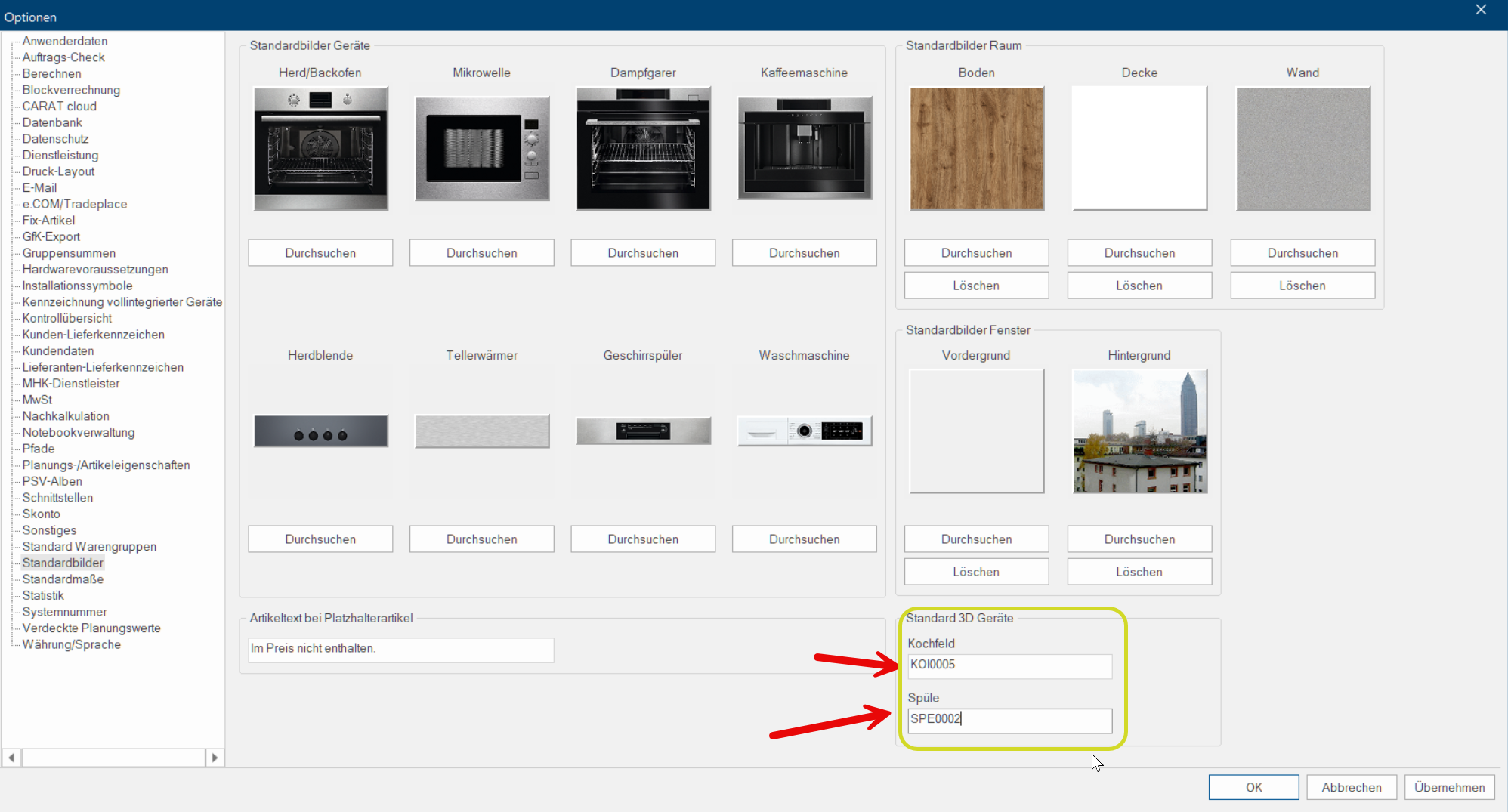
When including cabinets for hobs or sinks you can now define which 3D articles will be added automatically as dummy articles. You can make your choices in the system options in the Standard pictures area using the field Default 3D appliances by entering the according article numbers from the neutral catalogue.
|
|
Modification |
CARAT emotion menu bar |
The design of the CARAT emotion menu bar and the names of the contained features has been updated.
See also: CARAT emotion |
|
CG-4311 |
Corner units |
The cause for missing or incorrect display of handles on the opening side of carousel cabinets has been resolved. |
|
CG-4290 |
Edit modular niche |
The cause for crashes when immediately replacing planned articles in the dialogue Edit modular niche has been resolved. |
|
CS-11098 |
Garantiedatenbank |
For planned Guarantee articles no VAT may be shown. In case a VAT is shown anyway because of a stored tax rate with the customer, the parts list will now show a notification for correction on the article. After adjusting the article the Guarantee certificate must be opened again. Afterwards, the calculation in the parts list will be displayed correctly without VAT. |
|
CS-11325 |
Displaying combined generated articles |
Articles that have been selected via Summarise generated articles on the Article tab in the Print layout will now be displayed with the correct total per catalogue when printing commercial documents. |
|
CS-11447 |
Parts list - Manual sorting |
Errors that occurred when transferring a sub-article under another main article during manual sorting have been resolved. |
|
CS-11642 |
Print preview QR code |
The displayed size of QR codes in print preview has been adapted to the size of QR codes on printouts. |
|
CS-11698 |
New CARAT database - Planning overview |
Deleted planning variants will not be displayed in the planning overview anymore. |
|
CS-11709 |
New CARAT database - Logged-on users |
When CARAT is re-started after an erroneous system shutdown, only newly logged-on users will have the status Users currently logged-on in the Show logged-on users dialogue. |
|
CS-11716 |
Menu bar - Info |
After clicking on Info in the menu bar now all information from the dialogue Information about CARAT is displayed completely again. |
|
CS-11724 |
Subsidiary administration (5W) |
When creating data packets a Verification for empty packets will take place. If empty packets are found you will receive an error message. |
 Hotfix V2026.2.2.2 (This version contains only bug fixes)
|
ID: |
Area: |
Note: |
|---|---|---|
|
CS-11718 |
Subsidiary administration |
When importing data packages into the branches, there are now no errors occurring when creating the status packages |
Servicepack V2026.2.2.1
|
ID: |
Area: |
Note: |
|---|---|---|
|
Improvement |
e.COM |
When displaying e.COM orders, the advisor who created the order is now always shown, instead of the advisor who currently has the order open. |
|
CS-11630 |
Subsidiary administration (5W) |
The causes of partially incorrect creation of data packages in the service branch have been resolved. |
|
CG-4268 |
Changes in model selection |
Changing a variant of a height-adjustable item (e.g., a panel) no longer results in an adjustment of the dimensions of the selected item. When changing the plinth height, the article height is only adjusted by the respective difference. |
|
CG-4177 |
Floor plan |
Moving a selected group of cabinets with a generated item is now possible again. |
|
CG-4200 |
Copy installation symbols |
When copying installation symbols, the selected symbol color is now displayed in the transfer dialog. |
|
CG-4217 |
Parts list |
For planned corner panels, a width and depth dimension is now displayed again in the item text, along with the angle if it deviates from the standard. |
Featurepack V2026.2.1.2
|
ID: |
Area: |
Note: |
|---|---|---|
|
New |
CARAT service |
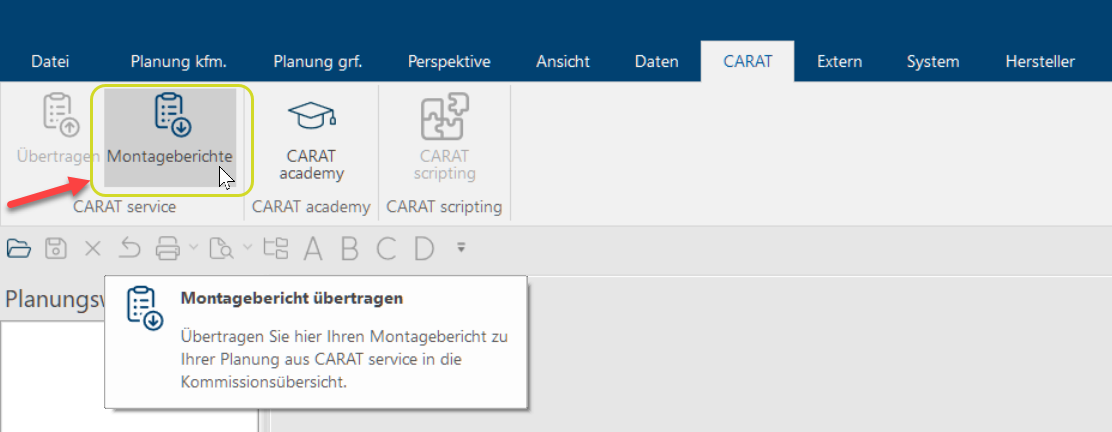
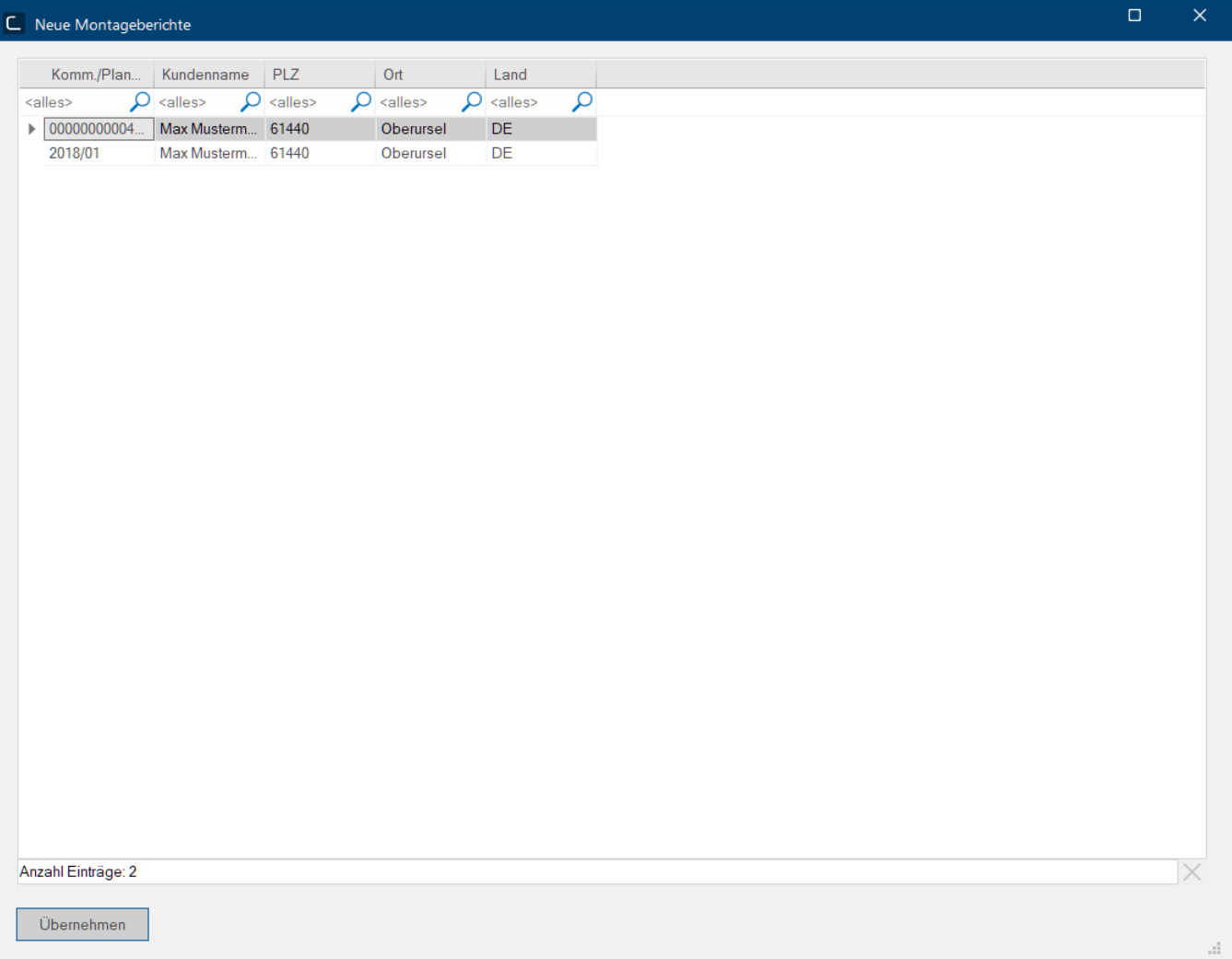
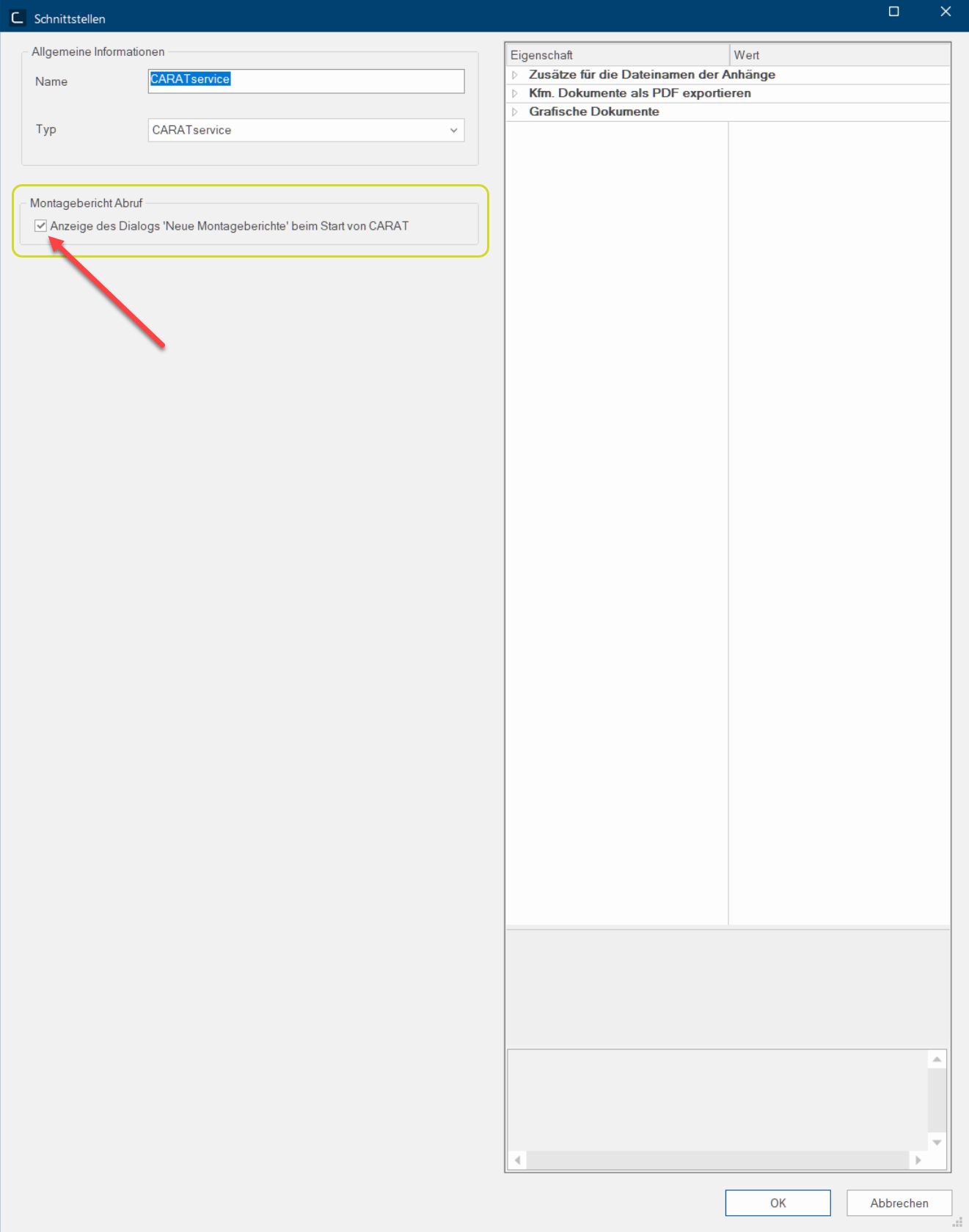
On the CARAT tab the menu ribbon has been enhanced by the feature Assembly reports. Here you will find the new assembly reports that have been transferred from CARAT cloud to CARAT , displayed in a separate dialogue. If you have a planning already opened in CARAT and use this feature, the following dialogue will display only those new assembly reports that are related to this planning. Otherwise, you will see all new assembly reports. The retrieved assembly reports will be stored in PDF format The format or formatting (Latin, forma) is designated in word processing as the design of the text document. In this case meaning the selection of character fonts and character style such as bold or italics. in the Assembly reports file of the respective commission overview. In the system options on the Interfaces tab you can also optionally set the dialogue New assembly reports to open automatically with every start of CARAT. This setting will be offered after double-clicking the CARAT service interface. |
|
New |
Database migration |
Within the scope of further technical development, we will be gradually providing you with a new database for CARAT beginning with this version. The provision will take place in multiple steps. As soon as your environment will be provided for, we will inform you with a separate newsletter timely. |
|
New |
ERP Interface |
In the system options, interfaces, you can now activate the export of assembly reports by clicking Yes in the settings for the ERP interface under CARAT service. |
|
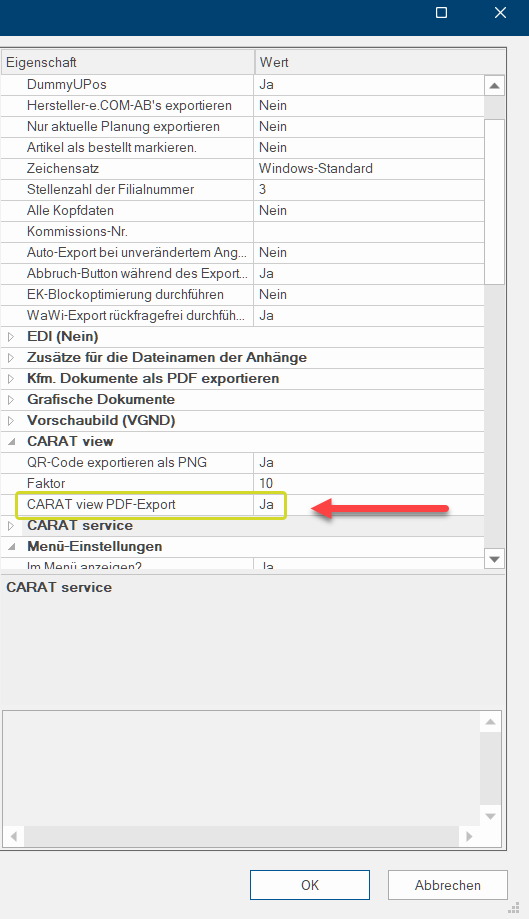
In the system options, in the interfaces area, you can now activate the CARAT view PDF export by clicking Yes in the settings of the ERP interface under Carat view. |
||
|
New |
Window styles |
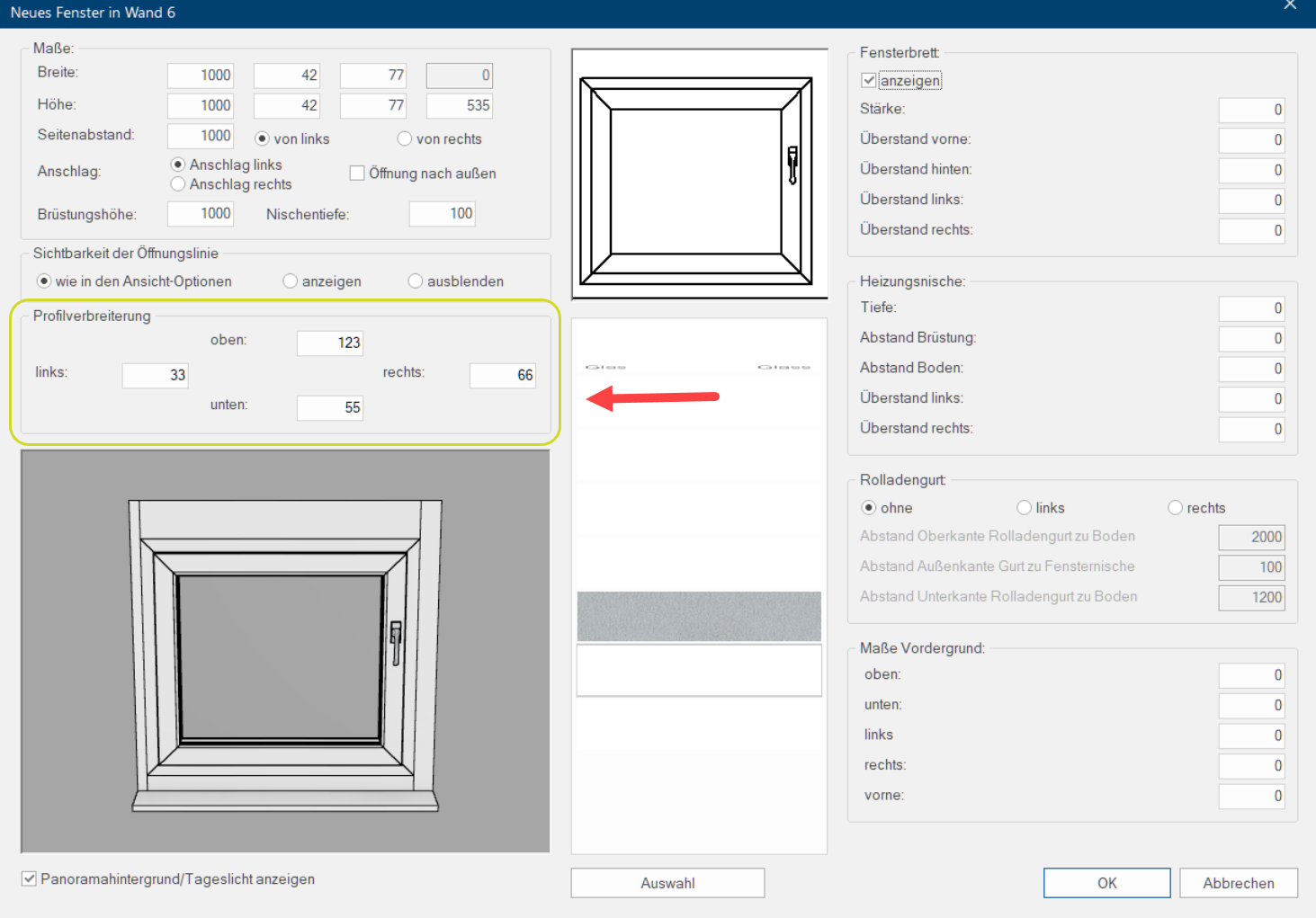
When planning and editing windows with the option Window styles you can now add existing Profile enlargements using 4 new entry fields (top, bottom, left, right).
|
|
New |
CARAT emotion |
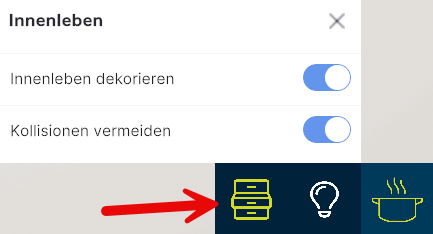
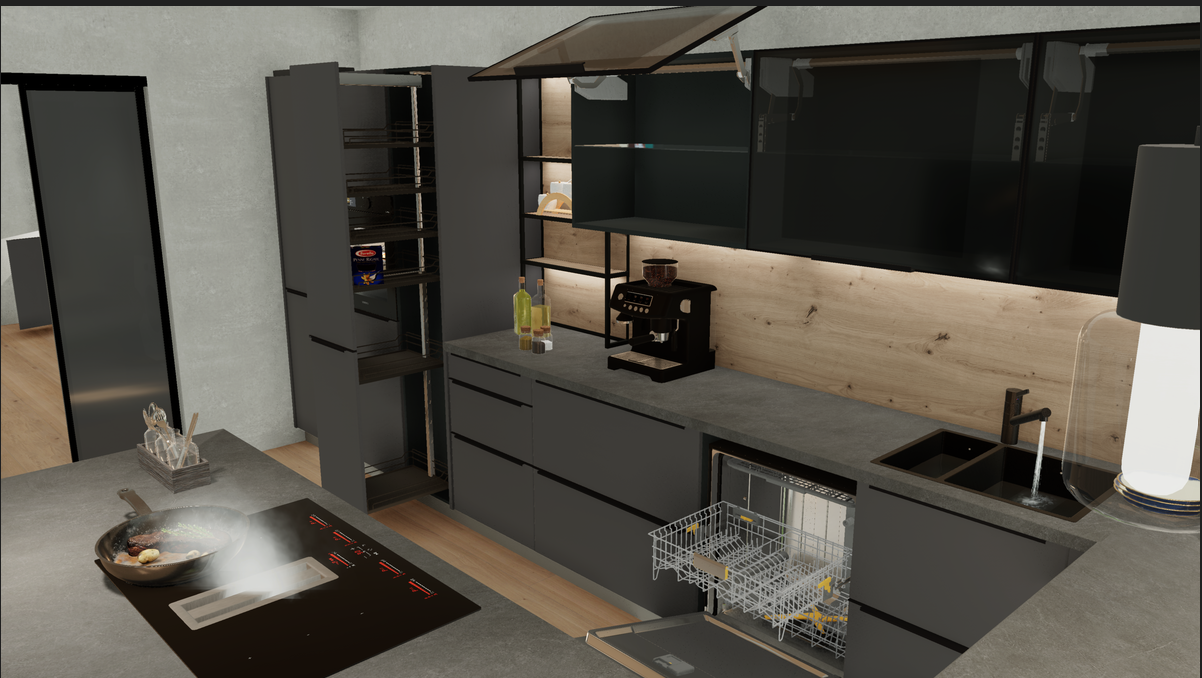
With the new expansion stage Level 3 of CARAT emotion your kitchen presentation will become way more realistic. You can now open cabinets and drawers simply by clicking on it with the mouse. In particular, for special cabinet solutions such as LeMans or Apothecary cabinets for example, you can now showcase their advantages in an especially vivid way. Expanding this new display possibility by home appliances has already been prepared and adapted to some articles from the neutral catalogue. |
|
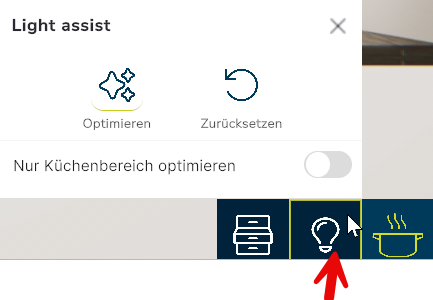
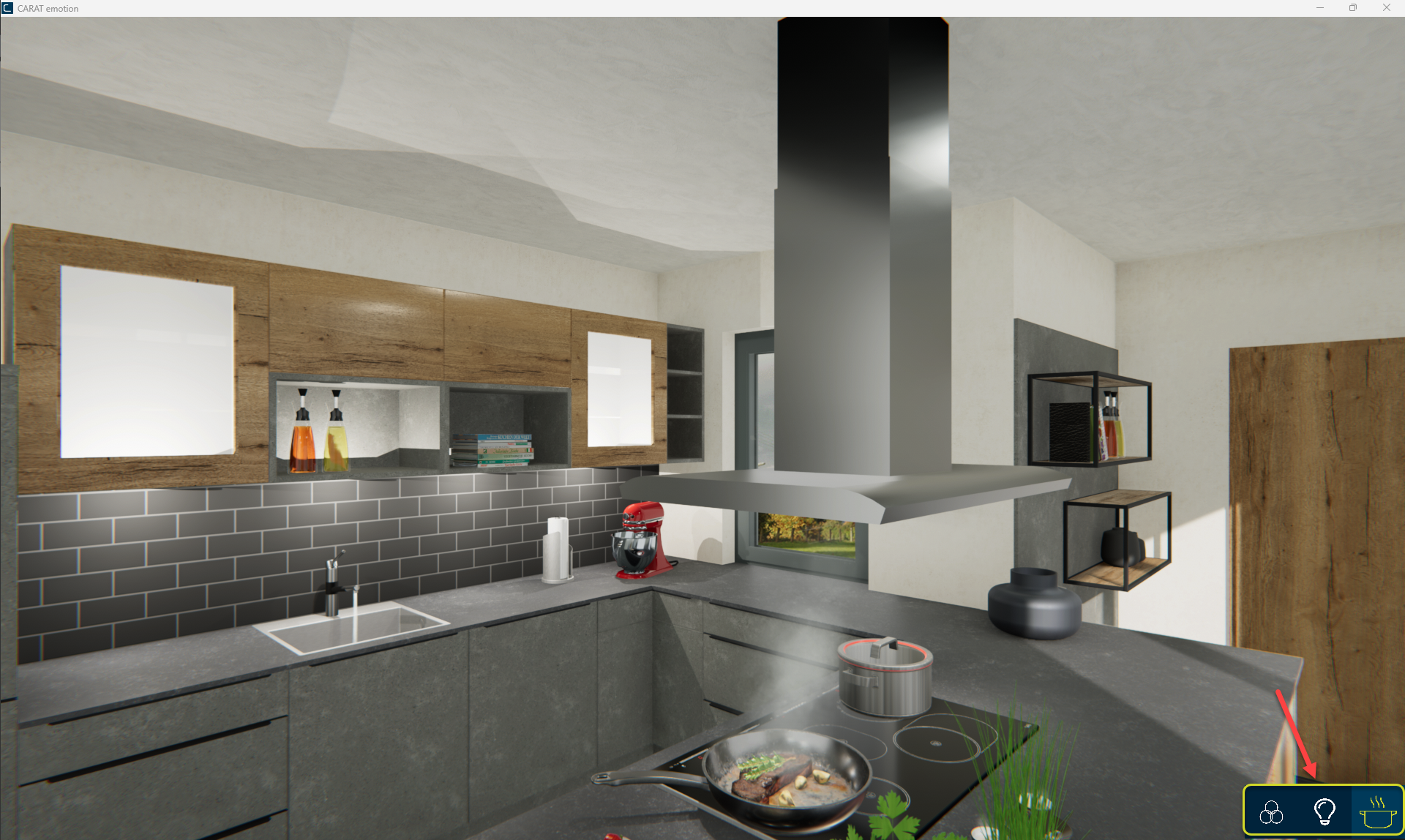
The user interface of CARAT emotion has been enhanced by a new toolbar in the lower right corner.
|
||
|
Modification |
Spotlights and Area lights |
The light of spotlights and area lights can not be edited anymore via the context menu In almost all Windows programs a click with the RIGHT mouse button opens a context menu containing a list of commands that are commonly the next step of a procedure. that appears by right-clicking into the perspective. Alternatively, you can still edit these lights via the menu bar on the perspective tab by clicking on Edit artificial light. See also: Artificial light |
|
Modification |
Edit front segmentation |
Changes in the partitioned front area of an article will not affect corner covers and handle bars in other front areas anymore. |
|
Improvement |
Notebook synchronization with OC transfer (4 T) |
The required data for an OC transfer will now be created and transferred automatically when synchronizing a notebook with a server A server is a central computer in a designated network structure, from which the resources of the central computer can be accessed by multiple workstations (clients). if the module OC transfer (4 T) is activated. |
|
Improvement |
CARAT emotion |
Light radiations of arbitrarily formed light strips will now be displayed as well. |
|
The display of contour-intensified plannings was optimized. |
||
|
The setting of the slide control for the manual brightness adjustment in the CARAT emotion scene was optimized. |
||
|
It is now possible to simultaneously move around in the CARAT emotion scene via a controller and to work in CARAT. |
||
|
Panoramic backgrounds used in the perspective will now be transferred to the CARAT emotion scene. |
||
|
Improvement |
You can now edit materials and textures In computer graphics, one uses textures as surfaces of a 3D models. of animated presentation articles. These changes will then also be visible in CARAT emotion. |
|
|
Improvement |
Tradeplace |
The new Tradeplace interface in the system options is now available for all countries in CARAT. See also: e.COM / Tradeplace See also: Manufacturer overview Tradeplace |
|
Improvement |
Articles with multiple fronts |
For articles with multiple fronts you can now edit each front by its own in the dialogue Edit front partitioning. Thus, you can assign different colors if offered by the manufacturer. |
|
Improvement |
CARAT view |
PDF documents with QR code that have been created in CARAT view can now be exported via the ERP interface if it has been activated by clicking Yes in the system options on the interface tab.
|
|
Improvement |
Worktops |
Joining outlines of worktops is now always possible as long as it is generally feasible, independent from the order of the highlighting of the worktops. |
|
Improvement |
Add -on article |
It is now possible to Edit the quantity of add-on articles without displaying article properties graphically. Thus, the hitherto needed multiple planning of the same article is obsolete. |
|
Improvement |
Neutral catalogue |
The features in the user interface for the search results in the neutral catalogue have been enhanced and the usability was opitimzed.
See also: Video Neutral catalogue 2026 |
|
Improvement |
ERP Interface |
The Service date is now also transferred during the export of the Advance payment invoice. |
|
Improvement |
Floor plan |
CAD The term CAD stand for Computer Aided Design. All detailed articles from a particular manufacturer, as well as the neutral catalogues in CARAT, are generated with CAD. articles are now displayed with a floor plan cross line. |
|
Improvement |
Commission Overview |
e.COM order confirmations are now displayed in the folder commission overview sorted by date. |
|
When Changing the subsidiary number, the current subsidiary is now preallocated in the commission overview. |
||
|
Improvement |
Laser measuring |
The CARAT laser measuring interface has been enhanced. You can now transfer the following window properties for measured windows together with the measuring file (EGI file), provided that this feature is already used by your measuring service provider.
|
|
Improvement |
Operating CARAT offline |
The grace period for the offline operation of CARAT during connection failure to the CARAT cloud or the internet has been extended to 72 hours. Thus, even failures during the weekend are covered. |
|
CG-4142 |
Installation plan |
The auxiliary lines for the icon dimensioning now do go up to the end of the auxiliary lines again, independent from displayed longer article dimensions. |
 Servicepack V2026.1.4.0
|
ID: |
Area: |
Note: |
|---|---|---|
|
CS-11528 |
Statistics |
The error source for sporadic crashes when generating the order statistics in CARAT has been located and fixed. |
|
CS-11478 |
Precalculation |
Additional conditions for articles with manually assigned sales prices are now calculated correctly for the purchase price. |
|
CS-11557 |
e.COM |
The generation of ORDER.ZIP The ZIP data format is an open format for compressing and archiving data. The archived file normally has a .zip file extension. files for the e.COM orders is working again. |
|
CS-11534 |
When an e.COM order fails due to technical reasons the order data will not be transferred anymore with the status Ordered during export into an ERP interface. |
|
|
CS-11532 |
Protocol |
All log files are now displayed again with the correct date. |
|
CS-11554 |
Parts list |
A mandatory article that has been created as a sub-Item for an alternative article can now be deleted again without crashes. Highlight the sub-item and open the context menu by right-click and select Edit alternative. Afterwards, click on the recycle bin icon in the window Alternative positions. |
|
CS-11564 |
Subsidiary administration (5W) |
If any kind of error during data packet import to a branch office occurs you can now find an error message in the log of the CARAT cloud portal in the subsidiary administration area. The related data packet will be deleted in the branch office. |
|
CS-11568 |
Subsidiary administration (4 A) without module 5 W |
The administrative branch office can now open the block prices tab again. |
|
CS-11565 |
Article import |
The import of article data in a self-created catalogue will now be completed even if it contains articles with price type The price type indicates basically if and how many list prices an item has. For example, a built-in oven has normally only one list price, it is therefore not "price group dependant". A base unit, in contrast, normally has a list price for each program/catalogue price group and is therefore "price group dependant". Price on application. |
Servicepack V2026.1.3.0
|
ID: |
Area: |
Note: |
|---|---|---|
|
Improvement |
VR mode |
With activated VR mode a position check will be executed. If your current camera position for the VR glasses within the perspective is outside of the kitchen planning you will receive a notification to select another position within the kitchen planning. See also: VR glasses |
|
Improvement |
Design selection |
The design selection function now can be deactivated for each catalogue separately on the Catalogue tab in the Options of the Catalogue master data. This will cause the column Design selection on the Variants tab to be hidden and therefore it is not possible anymore to assign the design selection to certain variants. Additionally, if the Design selection function is deactivated, you will receive a notification when clicking on Design selection in the print preview. See also: Design selection |
|
Articles of the Neutral catalogue and so-called Dummy articles that are used as a placeholder will not be issued anymore. |
||
|
In addition to the Header data number now even the Header name will be issued. |
||
|
CS-11551 |
Read in Master data |
Modified articles from an existing catalogue including their identification as Core range and the lodged Core prices Core price or also core-PP/core-SP in CARAT is designated as an absolute price. When a core price available is will the relevant price (PP / SP) no longer be calculated based on the list price and the deposited condition. will be recognized and completely transferred during a catalogue update Using the catalogue update function, a plan that was created with an old catalogue version can be fast and easily updated to a newer catalogue version. again. |
|
CS-11510 |
All self-created articles will be recognized and completely transferred during a catalogue update again. The precondition for this is that the notification Transfer of modified articles and self-created articles which appears during the import has been confirmed with Yes.
|
|
|
CS-11517 |
With activated GoBD capability the service date will, if available, now be printed on invoices and cancellations of invoices and submitted to the ERP export interface. |
|
|
CG-4221 |
3D export Trickpark VR (emotion) |
With the export from CARAT emotion to the Trickpark interface now even sinks and other articles with punched cut-outs are transmitted properly. |
|
CG-4185 |
Laser measuring POS |
Measured wall installation symbols will not be placed on floor or ceiling anymore. |
Servicepack V2026.1.2.0
|
ID: |
Area: |
Note: |
|---|---|---|
|
Improvement |
CARAT one |
The fuction archive commission is now also available in CARAT one |
|
Improvement |
Article import |
You can now select the output of the fields shippable from and shippable until during the article import. The automated filling of the fields refers to the fields valid from and valid until in the article data. |
|
Modification |
GfK Export |
The option Execute GfK export automatically on this workplace has been removed from the GfK-Export area in the system options. |
|
CUS-158 |
Article import |
If the date specification in the fields shippable from and shippable until in the excel sheet created for article import have been overwritten subsequently with 8 zeros each for the selected articles, the article import now will still be possible. In that way you can cancel the restrictions for these articles. |
|
CG-4115 |
CARAT one |
The cause for crashes during printing documents form the parts list has been eliminated. The crashes occurred when a document was printed first, then switched the commission and printed again a document from the new commission, while the option Show perspective on second monitor A monitor is a output device and/or a part of an output device used for displaying information or pictures. It is thus a display in a technical sense. (module 3 Z) was activated. |
Servicepack V2026.1.1.0
|
ID: |
Area: |
Note: |
|---|---|---|
|
Improvement |
CARAT one Login |
A new Comfort function has been implemented for the login into CARAT one. The last E-mail E-mail (electronic mail) is a letter like message transmitted electronically over a computer network. address used for the Login is now automatically pre-filled. |
|
CS-11454 |
Batch Print and Batch Mail |
When E-invoice is activated, it is not possible to Select advance payment invoices or invoices for Batch print and Batch mail. A relevant Message now appears when attempting to select them. See also: E-invoice |
|
CS-11397 |
Subsidiary administration (5W) |
The cause of an Incorrect status display in the Protocol after Reading in a Catalogue update in the Subsidiary has been identified and fixed. The status is now displayed correctly. |
|
CS-10254 |
After Switching to the new subsidiary administration (5W), only newly provided data packets can be uploaded to the CARAT cloud from your maintenance licence. This ensures that the Upload of new data packets does not fail due to old, un-processable data packets. Old data packets should already be distributed in full to the subsidiaries Before switching to the Subsidiary administration (5W).
|
|
|
CS-11380 |
Take over |
Existing catalogues and New catalogues available for selection are now also displayed in the Quotation take over dialogue if the Verification changeability of article has been activated in the Interface settings in the System options. |
|
CS-11394 |
Design selection |
Changed print layout settings for the Design selection are now loaded not only in new plans, but also in existing plans. See also: The design selection |
|
CUS-168 |
Login |
Logging in with a Network password now also works when a User logs in whose User group is assigned to a subsidiary that differs from the subsidiary stored in the system options under User Data. |
|
CG-4141 |
Generation |
The Generation of Worktops and Wall upstands of Corner base units has been corrected. |
|
CG-4120 |
Moving articles |
Moving unmarked articles under the Mouse pointer position is possible again. |
|
CG-4085 |
Installation plan |
Horizontal dimension lines can now also be moved up or down using the Arrow keys The arrow keys, also named keys, are four buttons identified with arrow labels, usually arranged in one group, on the computer keyboard. Usually, there are exactly four arrows, up, down, left and right, arranged like on a compass or a podium. Arrow keys are used to move the cursor. They are helpful in menu-supported displays, to quickly select the desired menu item. on the keyboard. |
|
CG-4086 |
Planning graph. |
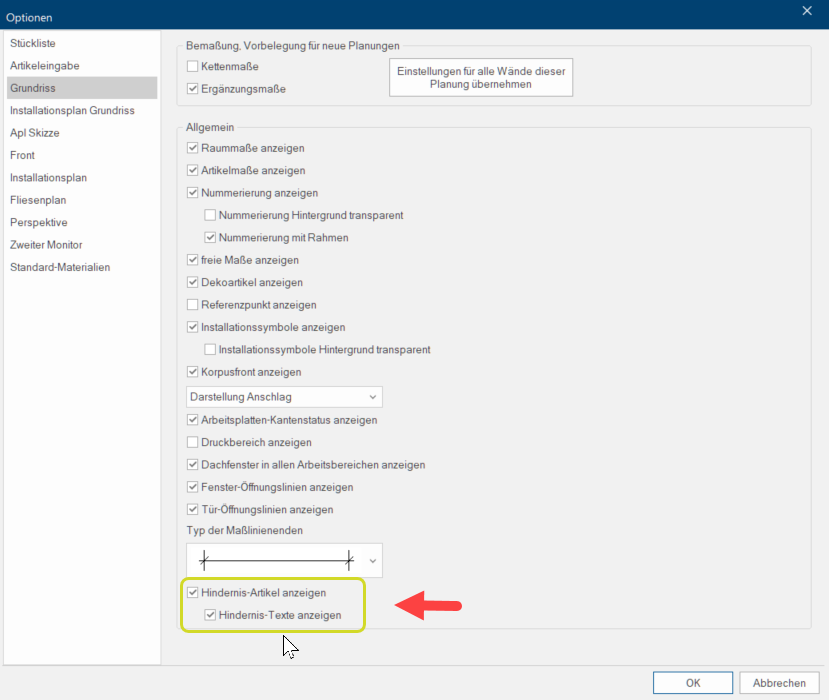
The Obstacle articles and Obstacle texts that were previously hidden in the Article dimensions working layer Because the ranges of a design often overlap in the floor plan (e.g. plinth, worktop, carcase etc.) these article groups are classified into working layers. in the floor plan can now be displayed. To do this, the Show obstacle article and Show obstacle texts options must be activated in the View options under Floor plan.
|
|
CG-4107 |
QuickClick |
The error that caused CARAT to crash when calling up an article in the neutral catalogue directly from QuickClick has been fixed. |
 Hotfix V2026.1.0.2
|
ID: |
Area: |
Note: |
|---|---|---|
|
New |
Rights |
In the Planning area, the New right 1201 Only display articles within availability (from/to) has been implemented. When activated, this means that only Available articles are displayed in the Article input dialogue. |
|
New |
MOEVE and ERP-Rest interface |
Under Interfaces in the System options, the new function Prevent catalogue update for existing article reservations has been added under ERP functions and MOEVE settings. If you activate this function with Yes, articles that have already been reserved in advance will not be replaced during a catalogue update. |
|
New |
MOEVE Interface |
Under Interfaces in the System options, the new setting Take over the SP The SP (selling price) in CARAT is a result of multiplying the CARAT list price by the entered net surcharge factor, plus VAT. price from MOEVE has been added under the MOEVE settings. If you activate this setting with Yes, the SP price provided by MOEVE will be taken over in the article automatically. |
Featurepack V2026.1.0.1
|
ID: |
Area: |
Note: |
|---|---|---|
|
Improvement |
Laser measuring |
Measured installation symbols located on the floor or ceiling are now taken over in the CARAT planning. |
|
Perspective |
LED-light strips in cabinets can now also be edited by using the Group-light-modification dialogue. See also: Group-lights-modification |
|
|
CARAT emotion |
Effects such as flowing water, steam, fire or sparkling drinks are now also visible in the plans, where this previously did not work due to faulty graphics downloads Downloading is a term used in electronic data processing. To download means to acquire data from another location (e.g. network PC or Internet) and transfer this data to your own computer.. |
|
|
It is now possible to use a Spacemouse to move in the CARAT emotion scene. |
||
|
Gallery |
The Quality of Gallery pictures that are created with CARAT emotion quality has been improved. |
|
|
Read in Master data |
The Query dialogue for the block transfer has been optimised. When Reading in catalogues, the Currently read in catalogue is now always displayed. |
|
|
Generation |
If the manufacturer provides this data, the Front ledges or handlebars on Dishwasher fronts with front ledges or handlebars are now generated with gaps. |
|
|
Floor plan and front view |
Individual Contour segments of a Cabinet group marked with a selection frame (elastic band) – such as Handle and front strips or Plinths – are now also Hidden in the perspective view. To do this, right-click on the marked cabinet group in the context menu and assign the property Permanently hide in perspective view to the group. |
|
|
CARAT password |
The maximum Length of the Password used for user login has been extended from 10 to up to 30 characters. This means that passwords with up to 30 characters, transferred via an ERP-REST interface to CARAT, can now also be processed. |
|
|
Front projection |
Adaptations to articles only reset front projections if they involve Dimension changes. |
|
|
Measure distance |
When positioning Sink fittings in the Floor plan, the centre point of the tap hole can now be determined in the Measure distance dialogue by selecting the Centre point option in the Till area option. This eliminates the need for manual calculation of dimensions on Stone or granite worktops. |
|
|
ONE- 191 |
CARAT one |
If an Crash occurs during Invoice creation in CARAT one with activated GoBD capability, the missing invoice document can now be generated by Reprinting the invoice. This is also indicated by a corresponding Note displayed. |
|
CS-11272 |
Commission Overview |
When Opening a CARAT planner planning the "Please enter 30 characters maximum" message no longer appears if the CARAT planner ID is still entered as the customer's Last name. This message now only appears if a Last name longer than 30 characters is entered as the customer's surname when editing the CARAT planner planning. |
|
CUS-113 |
COGITO |
The cause of Crashes when Opening commissions has been fixed. |
|
CG-4093 |
Perspective and preview images |
The cause of reported Faulty graphical representations has been fixed. |
|
CG-4109 |
Laser measuring MMM (Eximus) |
Displaying ordered laser measurings in the Commission overview in the Eximus laser measuring folder functions again. |
|
CG-4079 |
Catalogue update |
Adjustments have been made to the Positioning of 3D built-in appliances (telescopic extractor hoods). This applies to cases where the cabinet and appliance were planned using the same catalogue. |
|
CG-3026 |
Perspective |
The Representation of the contour intensification of CARAT kitchen+space articles has been corrected. |
|
CG-4018 |
ERP-Export and Batch Print |
The Visibility of all articles in the current scene now remains, even if the Export from CARAT or the Batch print contains camera positions with hidden articles. |
|
CG-4082 |
CARAT emotion |
Switched off lights are no longer taken into account by the Illumination optimisation. |


